
VC 8000 Series 5" Display Support
For Model 8010-5S
1. Power Requirements and Helpful Suggestions
*DO NOT PLUG THE MACHINE INTO AN EXTENSION CHORD* Additionally, VC strongly recommends ensuring the outlet that the machine is plugged into has its own dedicated breaker switch with a minimum of 20 AMPS & 120 Volts.
*OPTIONAL* We strongly suggest plugging in a surge protector between your machine plug & outlet.
This will protect your machine from any damages that could come from power outages, tripped breakers, or other electrical surges that may occur at any given time at a location.
This will protect your machine from any damages that could come from power outages, tripped breakers, or other electrical surges that may occur at any given time at a location.
2. Prepping Money Systems
- Unload products from a selection.
- Make purchases from the empty selection using only nickels, then only dimes, then only quarters.
- Do this until there are 2 rolls of coins for each corresponding tube.
It's best to perform this action when the machine is not stocked with product yet OR you could make sure one of your selections are not yet loaded with product and simply use this selection only while following the next steps.
IF you choose to first load product in your machine before loading your coin acceptor, we suggest leaving one of your highest selections without product to complete the coin stocking process faster.
Close your vending machine door and begin by making purchases using Nickels until all nickels have been inserted into the vending machine. Repeat this step for dimes & quarters.
To know how many coins you will need to load into your coin acceptor, simply count how many Coin Tubes you have in your coin acceptor - you will need 2 rolls of coins for each coin tube you see.
Example 1: 3-Tube Coin Acceptor (1 Quarter Tube, 1 Dime Tube & 1 Nickel) = 2 rolls of Quarters ($20.00), 2 rolls of Dimes ($10.00) & 2 rolls of Nickels ($4.00)... $34.00 total in change.
Example 2 (Coin Configuration may vary): 4-Tube Coin Acceptor (2 Quarter Tubes, 1 Dime Tube & 1 Nickel) = 4 rolls of Quarters ($40.00), 2 rolls of Dimes ($10.00) & 2 rolls of Nickels ($4.00)... $54.00 total in change.See page _ in manual for instructions on how to load your drink vending machine.
3. How to Load Product
- Flip up the side tabs on a shelf.
- Pull the shelf out and lean it down.
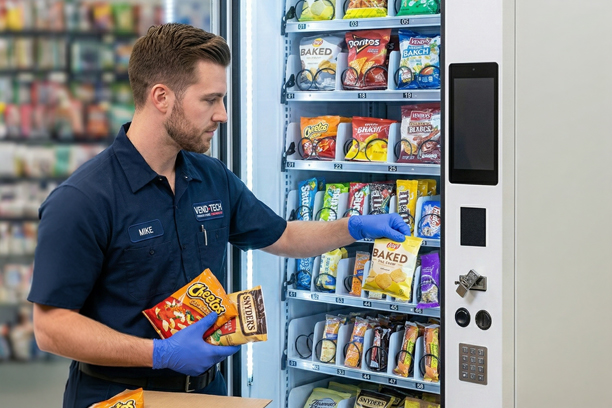
- Load the products from back to front.
- Push shelf back in and repeat.
- Update stock in necessary.
1. Use your key to open the machine door, giving you access to the shelves in the machine.
2. On the side of each shelf where it meets the machine walls, there are tabs that hold the shelf in place. Flipping up these tabs will allow the shelf to move. Note: If your machine has zip ties on the side of each shelf, you are free to remove those as they are meant to hold the shelves in place during the shipping process.
3. Pull the shelf outwards. Once it has reached its limit, most shelves will tilt down somewhat. This is to make the loading process easier. Only have one shelf in the loading position at a time.
4 a. Snacks and Drinks- Take the snacks and load them from the back to the front. When placing snacks in the coil, make sure its bottom rests on the shelf itself, and not on the coil.
4 b. Drinks (16.9/20 oz) - These drinks require a different loading style. When loading them, place them upside down so that their cap touches the shelf, and their bottom is pointing up.
Note: Any product resting on the coil itself may cause a jam, so be sure to load them with their bottoms touching the shelf itself.
Note: Any product resting on the coil itself may cause a jam, so be sure to load them with their bottoms touching the shelf itself.
5. Once the products have been loaded, roll the shelf back into place. Make sure the tabs are returned to their original positions.
6. Repeat steps 2 through 5 for every shelf.
7. Once loaded, your machine will likely require its stock to be updated. Reference your manual for information about telling your machine it is stocked or loaded
Change Price (Page 9)
Load Coins (Page 13)
Stock Products (Page 9)
Still need help? Fill out a technical support ticket here!